Différences entre versions de « Help/Formatting »
| Ligne 156 : | Ligne 156 : | ||
! Description !! You type !! You get | ! Description !! You type !! You get | ||
|- | |- | ||
| − | | Inserted (Displays as underline in most browsers) || < | + | | Inserted (Displays as underline in most browsers) || <pre><ins>Inserted</ins> |
| + | or | ||
| + | <u>Underline</u></pre> || <ins>Inserted</ins><br>or<br><u>Underline</u> | ||
|- | |- | ||
| − | | Deleted (Displays as strike-through in most browsers) || < | + | | Deleted (Displays as strike-through in most browsers) || <pre><s>Strike-through</s> |
| + | or | ||
| + | <del>Deleted</del></pre> || <s>Strike-through</s><br>or<br><del>Deleted</del> | ||
|- | |- | ||
| Blockquotes || <pre>Text before | | Blockquotes || <pre>Text before | ||
Version du 24 octobre 2020 à 23:05
You can format your text by using wiki markup or the visual editor.
Wiki markup
Wiki markup consists of normal characters like asterisks, apostrophes or equal signs which have a special function in the wiki, sometimes depending on their position. For example, to format a word in italic, you include it in two pairs of apostrophes like ''this''.
Text formatting markup
Character (inline) formatting – applies anywhere
| Description | You type | You get |
|---|---|---|
| Italic text | ''italic'' |
italic |
| Bold text | '''bold''' |
bold |
| Bold and italic | '''''bold & italic''''' |
bold & italic |
| Escape wiki markup | <nowiki>no [[wiki]] ''markup''</nowiki> |
no [[wiki]] ''markup'' |
Section formatting
Only at the beginning of the line
| Description | You type | You get |
|---|---|---|
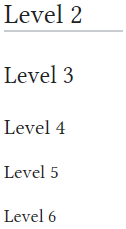
| Section Headings of different levels | == Level 2 == === Level 3 === ==== Level 4 ==== ===== Level 5 ===== ====== Level 6 ====== Skip Level 1, it is page name level. Do not put any text on the same line after the ending equal signs. An article with 4 or more headings automatically creates a table of contents. |
|
| Horizontal rule | Text before --- Text after |
Text before Text after |
| Bullet list | * Start each line * with an asterisk (*). ** More asterisks give deeper *** and deeper levels. * Line breaks <br />don't break levels. *** But jumping levels creates empty space. Any other start ends the list. * combine bullet list ** with definition ::- definition ** creates empty space * combine bullet list ** with definition *:- definition ** without empty spaces *bullet list :- definition :* sublist that doesn't create empty :* spaces after definition |
Any other start ends the list.
|
| Numbered list | # Start each line # with a number sign (#). ## More number signs give deeper ### and deeper ### levels. # Line breaks <br />don't break levels. ### But jumping levels creates empty space. # Blank lines # end the list and start another. Any other start also ends the list. |
Any other start also ends the list. |
| Definition list | ;item 1 : definition 1 ;item 2 : definition 2-1 : definition 2-2 |
|
| Mixture of different types of list | # one # two #* two point one #* two point two # three #; three item one #: three def one # four #: four def one #: this looks like a continuation #: and is often used #: instead <br />of <br /> # five ## five sub 1 ### five sub 1 sub 1 ## five sub 2 |
|
Paragraphs
MediaWiki ignores single line breaks. To start a new paragraph, leave an empty line. You can force a line break within a paragraph with the HTML tag <br />.
HTML tags
Some HTML tags are allowed in MediaWiki, for example <code>, <div>, and <span>. These apply anywhere you insert them.
| Description | You type | You get |
|---|---|---|
| Inserted (Displays as underline in most browsers) | <ins>Inserted</ins> or <u>Underline</u> |
Inserted or Underline |
| Deleted (Displays as strike-through in most browsers) | <s>Strike-through</s> or <del>Deleted</del> |
or |
| Blockquotes | Text before <blockquote>Blockquote</blockquote> Text after |
Text before
Text after |